Loop Node
Execute iterative workflows with flexible loop control and result aggregation
The Loop node enables powerful iterative processing in workflows, supporting multiple loop types (for, while, foreach, do-while) with intelligent break/skip conditions and automatic result aggregation. Whether processing collections, implementing retry logic, or handling complex iterative algorithms, this node provides enterprise-grade loop control.
Intelligent Loop Control
Universal loop processing with condition-based control and result aggregation
Overview
The Loop node is your workflow's iteration engine, capable of handling all common loop patterns with intelligent control flow and automatic result aggregation. From processing collections to implementing retry logic, it provides the flexibility and reliability needed for complex iterative workflows.
Key Capabilities
Universal Loop Support
For, while, foreach, and do-while loops with automatic type detection and processing.
JEXL Condition Engine
Break and skip conditions using powerful JEXL expressions with 40+ transforms.
Smart Aggregation
Automatic result accumulation with type-aware output conversion (number, string, array, object).
Dual Routing
Two routing paths (loop/done) for flexible workflow branching and iteration control.
Use Cases
- Collection Processing: Iterate over arrays of data with automatic item extraction
- Retry Logic: Implement exponential backoff and retry mechanisms
- Batch Processing: Process large datasets in configurable chunks
- Conditional Iteration: Continue looping while conditions are met
- API Pagination: Handle paginated API responses with automatic iteration
- Data Transformation: Apply operations to each item in a collection
- Workflow Orchestration: Coordinate complex multi-step iterative processes
Configuration Guide
The Loop node doesn't require explicit type selection. Instead, its behavior emerges from how you configure it. By combining different settings (foreach mode, break conditions, max iterations), the loop naturally behaves like different loop patterns.
1. Loop Behavior Patterns
The Loop node can exhibit four different loop behaviors based on configuration:
Counter-Based (For-like)
Fixed iteration count with index tracking
- Set max_iterations to fixed value
- No break condition needed
- Use starting_index to skip initial items
Example: Process exactly 10 items
Condition-Based (While-like)
Continue while condition is true
- Set break_condition for exit logic
- Always set max_iterations as safety limit
- No foreach mode needed
Example: Process until status becomes "complete"
Collection Iteration (Foreach-like)
Process each item in an array
- Enable foreach mode (foreach: true)
- Input should be an array/collection
- Optional: use starting_index to skip items
Example: Process each user in a user list
Execute-Then-Check (Do-While-like)
Execute at least once, then check condition
- Set break_condition for exit logic
- First iteration always executes
- Set max_iterations as safety limit
Example: Validate data and retry until successful
Note: These are behavioral patterns, not separate node types. The same Loop node can exhibit any of these behaviors depending on how you configure it.
2. Loop Control Parameters
Configure iteration behavior and limits.
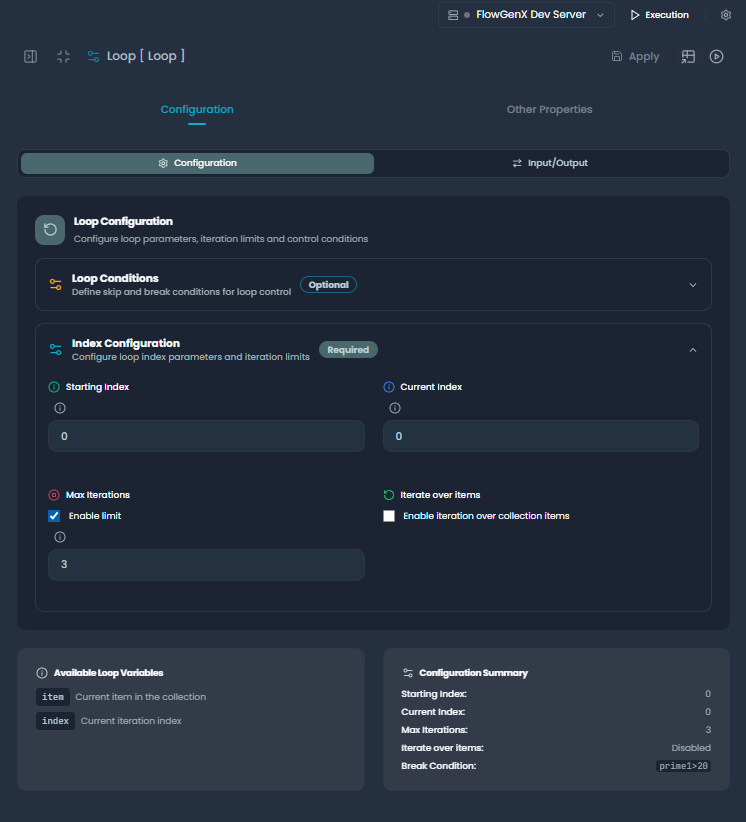
Loop Parameters configuration showing iteration controls
Iteration Controls
Starting Index:
- Purpose: Where to begin iteration (for collections)
- Type: Integer (default: 0)
- Use: Skip initial items in a collection
- Example: Start processing from the 5th item in an array
Max Iterations:
- Purpose: Safety limit to prevent infinite loops
- Type: Integer (default: 0 = unlimited)
- Use: Always set when using break conditions, or set to fixed value for counter-based iteration
- Example: Allow maximum 100 retry attempts
Current Index:
- Purpose: Tracks current iteration position
- Type: Integer (managed automatically)
- Use: Usually managed by the system, can be set for testing
- Example: Manually set to test specific iteration behavior
Loop Mode Toggle
Foreach Mode:
- Purpose: Enable collection iteration
- Type: Boolean (default: false)
- Behavior: Automatically extracts individual items from arrays
- Example: When enabled, array [A,B,C] becomes individual items A, B, C
3. Break and Skip Conditions
Define when to exit or skip iterations using JEXL expressions.
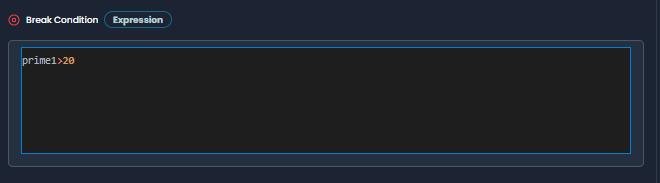
Break and Skip Conditions using JEXL expressions
Break Condition
Purpose: Defines when to exit the loop completely
Examples:
// Status-based breaking
status == "completed"

// Counter-based breaking
attempts >= max_attempts

// Error condition breaking
error_count > 3

// Complex condition breaking
user.active == false || account.suspended == true
Skip Condition
Purpose: Defines when to skip the current iteration and continue to the next
Examples:
// Skip invalid items
item.status == "invalid"

// Skip already processed
processed_items | contains(item.id)

// Skip based on type
item.type == "deprecated"
Important Notes:
- Break conditions cause immediate loop termination
- Skip conditions skip current iteration but continue looping
- Both use JEXL expression syntax
- Empty conditions (blank) are ignored
4. Output Configuration
Define how aggregated results should be formatted. The Loop node automatically aggregates results from all iterations and converts them to your specified output type.
Output Types
Number:
- Extracts numeric values from iteration results
- Returns single number or array of numbers
- Useful for counters, sums, averages
String:
- Converts results to string representation
- Returns concatenated or formatted string
- Useful for logging, summaries
Array:
- Returns results as array (default behavior)
- Preserves iteration order
- Useful for maintaining collection structure
Object:
- Returns results wrapped in an object
- Format:
{"accumulated_results": [...]} - Useful for structured API responses
Routing Behavior
The Loop node provides two routing paths that control workflow flow.
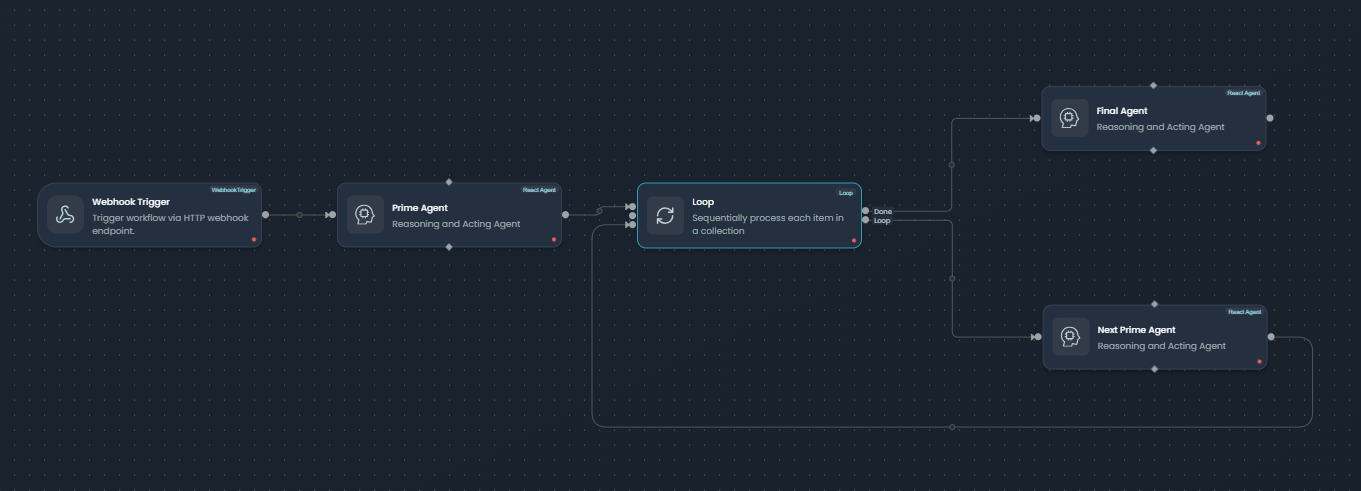
Workflow routing showing loop continuation and completion paths
Loop Path (Continue)
Triggers:
- Current iteration completes successfully
- Skip condition is met (skips to next iteration)
- Max iterations not yet reached
- Break condition not met
Actions:
- Increments current_index
- Accumulates current iteration result
- Returns to loop start for next iteration
- Passes current item to processing nodes
Done Path (Break)
Triggers:
- Break condition evaluates to true
- Max iterations reached
- Collection iteration completes
- Foreach loop finishes all items
Actions:
- Aggregates all accumulated results
- Converts output to specified type
- Routes to completion/summary nodes
- Provides final aggregated output
Expression Reference
JEXL Expression Syntax
The Loop node uses JEXL (JavaScript Expression Language) for break and skip conditions with access to the current iteration data.
// Direct field access
status == "active"
count > 10

// Nested object access
user.profile.verified == true
order.items[0].price > 100

// Array operations
tags | contains("urgent")
errors | length > 0

// Logical combinations
status == "pending" && priority == "high"
count >= max_count || timeout == true

// Type checking
value != null
typeof(amount) == "number"
Available Context
When writing expressions, you have access to:
// Current iteration data (direct access)
status, count, user, order, etc.

// Special variables
current_index    // Current iteration number (0-based)
starting_index   // Configured starting index
max_iterations   // Maximum allowed iterations
item             // Current item in foreach mode

// Collection metadata (foreach mode)
total_items      // Total items in collection
is_first         // Boolean: first iteration
is_last          // Boolean: last iteration
progress_percentage // Completion percentage
Transform Examples
| Transform | Example | Result |
|---|---|---|
length | items | length > 0 | Check array length |
contains | tags | contains("error") | Check array contents |
toNumber | value | toNumber > 100 | Convert and compare |
lower | status | lower == "active" | Case-insensitive comparison |
Complete Configuration Examples
Example 1: Collection Iteration Pattern (Foreach-like)
Process each user in a collection with error handling and result aggregation. Configured by enabling foreach mode.
{
  "node_type": "loop",
  "node_id": "process_users_001",
  "config": {
    "foreach": true,
    "starting_index": 0,
    "max_iterations": 0,
    "break_condition": "error_count >= 5",
    "skip_condition": "user.status == 'inactive'",
    "output": {
      "type": "array",
      "properties": {
        "processed_users": {
          "type": "array",
          "description": "List of successfully processed users"
        }
      }
    }
  }
}
Configuration Notes:
foreach: trueenables collection iteration behaviormax_iterations: 0means no limit (processes all items)break_conditionprovides safety exitskip_conditionfilters out inactive users
Workflow Behavior:
- Receives array of users as input
- Iterates through each user individually
- Skips inactive users
- Breaks if error_count reaches 5
- Aggregates results from successful processing
- Outputs array of processed user data
Example 2: Condition-Based Pattern (While-like)
Retry API call until success or max attempts reached. Configured with break condition and max iterations.
{
  "node_type": "loop",
  "node_id": "api_retry_001",
  "config": {
    "foreach": false,
    "starting_index": 0,
    "max_iterations": 5,
    "break_condition": "api_response.success == true || attempts >= max_attempts",
    "skip_condition": "",
    "output": {
      "type": "object",
      "properties": {
        "final_result": {
          "type": "object",
          "description": "Final API response or error details"
        }
      }
    }
  }
}
Configuration Notes:
foreach: falsemeans single-item iterationmax_iterations: 5sets safety limitbreak_conditiondefines exit criteria- No skip condition needed
Workflow Behavior:
- Makes API call in each iteration
- Checks if response is successful
- Continues until success or 5 attempts reached
- Aggregates attempt history
- Outputs final successful response or last error
Example 3: Counter-Based Pattern (For-like)
Process data in fixed-size batches with progress tracking. Configured with fixed max iterations.
{
  "node_type": "loop",
  "node_id": "batch_processor_001",
  "config": {
    "foreach": true,
    "starting_index": 0,
    "max_iterations": 10,
    "break_condition": "",
    "skip_condition": "batch | length == 0",
    "output": {
      "type": "array",
      "properties": {
        "processed_batches": {
          "type": "array",
          "description": "Results from each processed batch"
        }
      }
    }
  }
}
Configuration Notes:
foreach: trueenables batch iterationmax_iterations: 10fixes iteration count- No break condition (relies on max_iterations)
- Skip condition filters empty batches
Workflow Behavior:
- Processes exactly 10 batches
- Each iteration receives a batch of items
- Skips empty batches
- Aggregates batch processing results
- Outputs complete batch processing summary
Example 4: Execute-Then-Check Pattern (Do-While-like)
Validate and clean data, ensuring at least one validation pass. Configured with break condition that executes after first iteration.
{
  "node_type": "loop",
  "node_id": "data_validator_001",
  "config": {
    "foreach": false,
    "starting_index": 0,
    "max_iterations": 3,
    "break_condition": "validation_errors | length == 0",
    "skip_condition": "",
    "output": {
      "type": "object",
      "properties": {
        "validated_data": {
          "type": "object",
          "description": "Clean validated data"
        },
        "validation_history": {
          "type": "array",
          "description": "History of validation attempts"
        }
      }
    }
  }
}
Configuration Notes:
foreach: falsefor single-item processingbreak_conditionchecked after each iterationmax_iterations: 3provides safety limit- First iteration always executes before checking break condition
Workflow Behavior:
- Always executes at least one validation pass
- Continues validating until no errors remain
- Limited to maximum 3 validation attempts
- Aggregates validation history and fixes applied
- Outputs clean data and validation summary
Integration with LangGraph Workflows
The Loop node integrates seamlessly with LangGraph's conditional edges system, creating iterative cycles in your workflow.
Workflow Cycle Structure
The Loop node creates a cycle in your workflow with conditional branching between loop continuation and completion:
State Management
The Loop node manages state throughout iterations, tracking progress and accumulating results:
Best Practices
1. Configuration Strategy
Configuration Guidelines
- • Enable foreach mode to process collections item-by-item
- • Use break_condition for condition-based iteration with unknown duration
- • Set max_iterations for fixed iteration counts or as safety limits
- • Combine break_condition with max_iterations when you need at least one execution but want safety limits
- • Always set max_iterations when using break conditions to prevent infinite loops
2. Condition Writing
Break Conditions:
- Keep simple and focused on exit criteria
- Use clear, boolean-returning expressions
- Include safety limits (max_iterations)
Skip Conditions:
- Use for filtering out invalid items
- Don't overuse - consider pre-filtering data
- Combine with break conditions for complex logic
3. Performance Considerations
Performance Optimization
- • Batch processing for large collections to reduce overhead
- • Pre-filter data before looping when possible
- • Use appropriate output types to minimize conversion overhead
- • Monitor iteration counts to prevent runaway loops
- • Consider async processing for I/O bound operations
4. Error Handling
Common Patterns:
- Use break conditions for error thresholds
- Include error counters in your data
- Set reasonable max_iterations as safety nets
- Log iteration details for debugging
Recovery Strategies:
- Implement exponential backoff in retry loops
- Use skip conditions for graceful error handling
- Aggregate error information for reporting
- Provide fallback outputs when loops fail
5. Testing and Validation
Test Scenarios:
- Empty collections (should break immediately)
- Single item collections
- Break conditions trigger correctly
- Skip conditions work as expected
- Max iterations are respected
- Output aggregation works for all types
- Error conditions are handled gracefully
Debug Checklist:
- Verify foreach mode detects collections correctly
- Test JEXL expressions with sample data
- Check that current_index increments properly
- Validate accumulated_results structure
- Confirm routing paths work as expected
Troubleshooting
Common Issues
| Issue | Cause | Solution |
|---|---|---|
| Infinite loops | Missing or incorrect break conditions | Add proper break conditions and max_iterations |
| Foreach not working | Input not recognized as collection | Ensure input is array and foreach is enabled |
| Wrong routing path | Loop state logic error | Check break/skip conditions and iteration logic |
| Results not aggregating | Output key mismatch | Verify output configuration and key names |
| JEXL expression errors | Invalid expression syntax | Test expressions and check syntax |
Debug Information
The loop node provides detailed debug information:
// Loop info structure
{
  "current_index": 2,
  "starting_index": 0,
  "max_iterations": 10,
  "total_items": 5,
  "items_processed": 3,
  "is_collection": true,
  "progress_percentage": 60.0,
  "has_break_condition": true,
  "has_skip_condition": false,
  "items_remaining": 2,
  "is_first": false,
  "is_last": false
}
Debug Commands:
- Check accumulated_results for iteration history
- Monitor current_index progression
- Validate JEXL expression evaluation
- Inspect routing decisions
Next Steps
Summary
The Loop node is your workflow's iteration powerhouse, providing universal loop support with intelligent control and automatic result aggregation:
- Flexible Configuration: Single node that behaves like different loop patterns (For, While, Foreach, Do-While) based on configuration
- JEXL Conditions: Powerful break and skip logic with 40+ transforms
- Smart Aggregation: Automatic result accumulation with type-aware output conversion
- Dual Routing: Clean loop/done branching for flexible workflow control
- Enterprise Features: Safety limits, progress tracking, and comprehensive error handling
- LangGraph Integration: Seamless integration with conditional workflow edges
Whether processing collections, implementing retry logic, or handling complex iterative algorithms, the Loop node provides the reliability and flexibility needed for production workflows. The loop behavior emerges naturally from how you configure it—no explicit type selection required.
This documentation covers the Loop node functionality as implemented in the FlowGenX workflow engine. For technical implementation details, refer to the loop router component in the runtime agents.