Router Node
Route data to different workflow paths based on conditions or expressions
The Router node enables intelligent data routing in workflows, directing data to different downstream nodes based on field-based conditions or dynamic expressions. Whether you're building complex decision trees, handling different data types, or implementing business logic branches, this node provides enterprise-grade routing capabilities with full expression support.
Intelligent Data Routing
Field-based conditions and expression-powered routing for complex workflows
Overview
The Router node is your workflow's traffic controller, intelligently directing data flow based on conditions or expressions. Unlike simple if/else logic, the Router node supports multiple routing paths, complex matching strategies, and enterprise features like nested field access and expression evaluation.
Understanding Branching
The Router node enables workflows to branch into multiple paths based on data conditions. This allows for sophisticated decision-making where each record can be routed to different processing nodes depending on its properties. Each Router node evaluates conditions and routes records to one or more output paths, creating dynamic workflow branching.
Key Capabilities
Dual Routing Strategies
Field-based conditions for simple rules or expression-based routing for complex logic.
Flexible Matching
First-match or all-match strategies for different routing behaviors.
Expression Engine
JEXL expressions with 40+ transforms for dynamic routing logic.
Nested Field Support
Access nested object properties using dot notation (e.g., user.address.city).
Use Cases
- Business Logic Branching: Route orders to different processing paths based on amount, region, or customer type
- Data Type Handling: Send different data formats to specialized processing nodes
- Error Recovery: Route failed records to retry queues or dead letter handling
- Content Moderation: Filter and route content based on categories, sentiment, or compliance rules
- Multi-tenant Routing: Direct data to tenant-specific processing pipelines
- Event-Driven Workflows: Route events to appropriate handlers based on event type and payload
Visual Workflow Example
The Router node enables complex branching workflows where data flows through multiple paths based on conditions. Here's an example workflow showing Router nodes directing data to different downstream nodes:
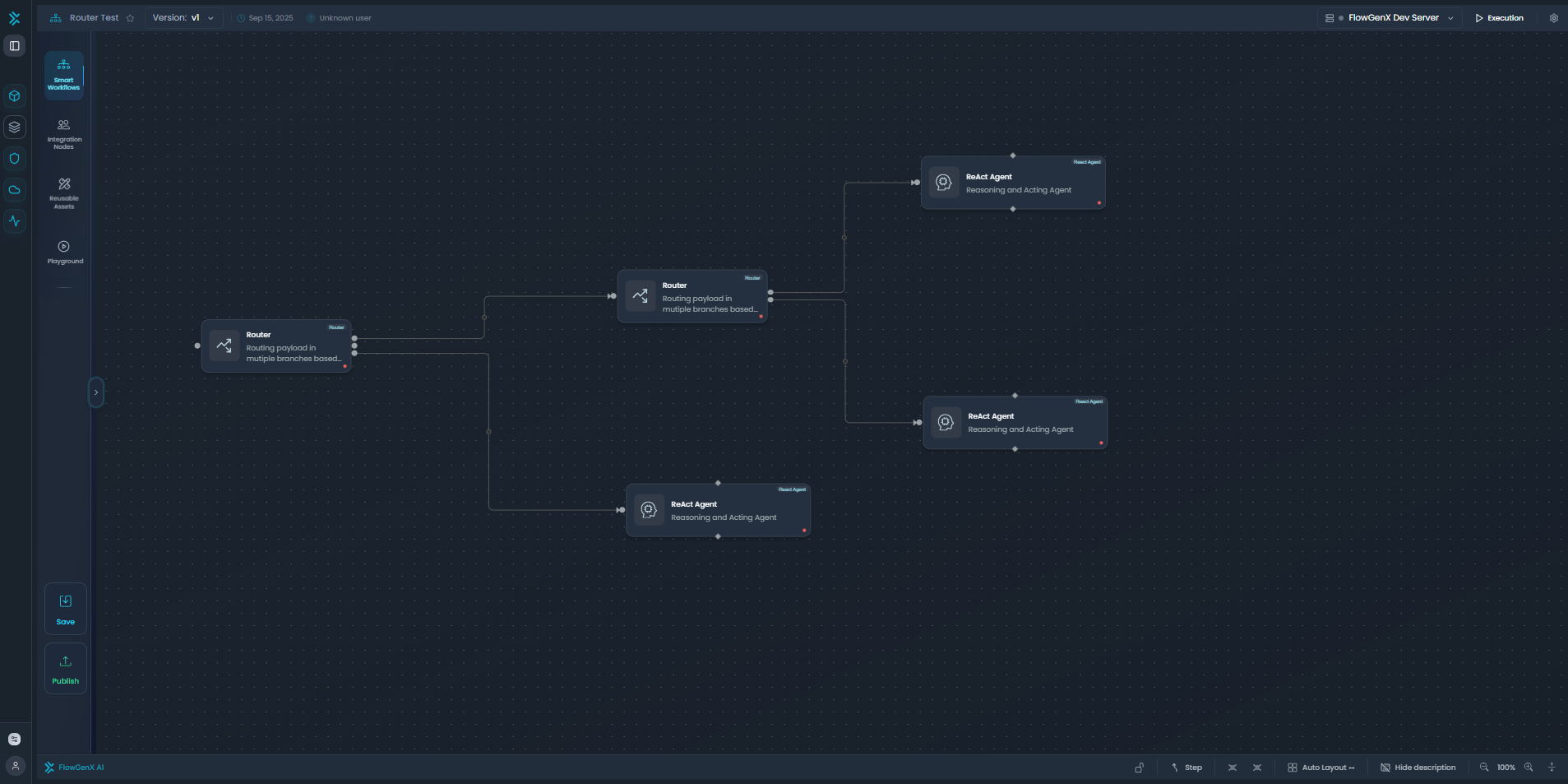
Example workflow showing Router nodes branching data to multiple ReAct Agent nodes based on routing conditions
In this example, Router nodes evaluate conditions and route payloads to different branches, enabling complex decision-making in workflows. Each Router node can have multiple output paths, allowing for sophisticated data routing patterns.
Configuration Guide
1. Routing Strategy Selection
Choose between field-based and expression-based routing strategies to match your use case.
Field-Based Routing:
- Best for: Simple conditions using column comparisons
- Use when: You have structured data with clear field boundaries
- Operators: 16+ comparison operators (equals, contains, greater than, regex, etc.)
- Performance: Fast evaluation, ideal for high-volume data
Expression-Based Routing:
- Best for: Complex logic combining multiple fields
- Use when: You need dynamic calculations or cross-field comparisons
- Engine: JEXL expressions with full transform library
- Flexibility: Access to 40+ transforms and functions
2. Matching Strategy
Control how multiple conditions are evaluated when routing data. The matching strategy determines whether a record is routed to the first matching condition or to all matching conditions.
First Matching Strategy:
- Evaluates conditions in order and routes on first match
- Each record goes to exactly one output path
- Use for: Mutually exclusive categories (high priority → low priority)
- Example: Priority routing (urgent → normal → low)
All Matching Strategy:
- Evaluates all conditions and routes matching records to multiple outputs
- Records can be duplicated across multiple paths
- Use for: Overlapping categories or fan-out scenarios
- Example: Multi-department notifications (sales + support for VIP customers)
3. Field-Based Routing Configuration
Configure conditions using column comparisons with powerful operators. Field-based routing allows you to create conditions by selecting a column, choosing an operator, and specifying a value to compare against.
Condition Configuration
Basic Structure:
- Column: The field name to evaluate (supports nested access with dots)
- Operator: Comparison operator to use
- Value: The value to compare against (not needed for IS_NULL/IS_NOT_NULL)
- Routing Path: Where to send matching records
- Description: Optional documentation
Supported Operators:
| Category | Operator | Description | Example Use Case |
|---|---|---|---|
| Equality | == | Exact match | Status equals "active" |
| != | Not equal | Priority not equal to "low" | |
| Comparison | > | Greater than | Amount > 1000 |
| < | Less than | Score < 50 | |
| >= | Greater than or equal | Age >= 18 | |
| <= | Less than or equal | Rating <= 3 | |
| String | contains | String contains substring | Description contains "urgent" |
| not_contains | String doesn't contain | Category not containing "test" | |
| starts_with | String starts with | Email starts with "admin@" | |
| ends_with | String ends with | File ends with ".pdf" | |
| List | in | Value in list | Status in ["pending", "approved"] |
| not_in | Value not in list | Region not in ["EU", "NA"] | |
| Null Checks | is_null | Field is null/empty | Missing phone number |
| is_not_null | Field has value | Has email address | |
| Pattern | matches_regex | Matches regex pattern | Email matches valid format |
| not_matches_regex | Doesn't match regex | Invalid format detection |
Nested Field Access:
For complex data structures, use dot notation to access nested properties:
{
  "user": {
    "profile": {
      "preferences": {
        "notifications": true
      }
    }
  }
}
Example Conditions:
user.profile.preferences.notifications == trueorder.items[0].category != "electronics"customer.address.country in ["US", "CA", "MX"]
Adding Multiple Conditions
You can add multiple conditions to a Router node. Each condition specifies a column to evaluate, an operator for comparison, a value to compare against, and a routing path where matching records should be sent.
First Matching Example:
// Conditions evaluated in order
[
  { "column": "priority", "operator": "==", "value": "urgent", "routing_path": "urgent_queue" },
  { "column": "amount", "operator": ">=", "value": 5000, "routing_path": "vip_processing" },
  { "column": "region", "operator": "in", "value": ["EU", "APAC"], "routing_path": "international" }
]
// Result: Record with urgent priority goes to urgent_queue, even if amount >= 5000
All Matching Example:
// All conditions evaluated
[
  { "column": "amount", "operator": ">=", "value": 1000, "routing_path": "large_orders" },
  { "column": "customer_tier", "operator": "==", "value": "premium", "routing_path": "vip_service" },
  { "column": "region", "operator": "==", "value": "US", "routing_path": "domestic" }
]
// Result: Premium customer with large US order goes to all three paths
4. Expression-Based Routing Configuration
Use JEXL expressions for complex routing logic that combines multiple fields.
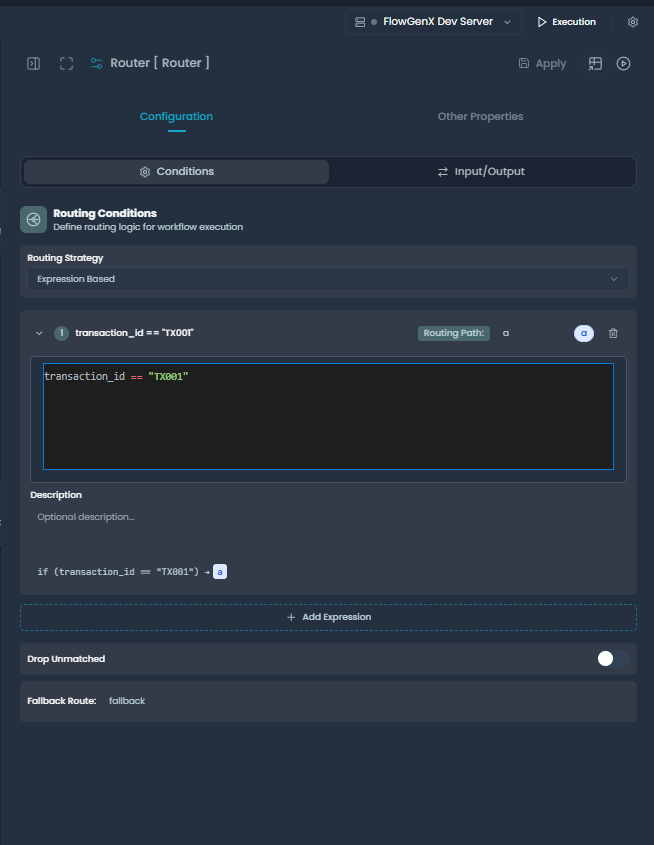
Expression-based routing configuration UI showing routing conditions, expression editor, and fallback route settings
Expression Configuration
Basic Structure:
- Expression Type: Currently supports JEXL (JavaScript Expression Language)
- Expression: Boolean expression that returns true/false
- Routing Path: Where to send records when expression evaluates to true
- Description: Optional documentation
Expression Examples:
Simple Field Comparisons:
// Direct field access
status == "active"

// Nested field access
user.profile.isVerified == true

// Multiple conditions with AND/OR
status == "pending" && priority == "high"

// Mathematical comparisons
order.total > 1000 && order.total <= 5000
Complex Business Logic:
// Customer segmentation
(customer.lifetimeValue > 5000 && customer.ordersCount >= 10) ||
(customer.tier == "premium" && customer.region in ["US", "EU"])

// Risk assessment
(order.amount > 10000 && customer.riskScore > 7) ||
(order.amount > 50000 && customer.verificationStatus != "verified")

// Time-based routing
order.createdAt > now().minusDays(1) && order.status == "pending"

// Content filtering
content.category in ["spam", "abuse"] ||
(content.sentiment < -0.5 && content.priority == "high")
Using Transforms in Expressions:
// String transformations
customer.email | lower | matches_regex("@company\.com$")

// Array operations
order.tags | length > 3 && order.tags | contains("urgent")

// Date operations
customer.createdAt | date('YYYY-MM-DD') < now().minusMonths(6)

// Conditional logic
if(customer.score | toNumber > 80, "high_value", "standard")
5. Fallback and Error Handling
Configure how unmatched records are handled. When a record doesn't match any routing conditions, you can either send it to a fallback route or drop it entirely.
Fallback Route
- Purpose: Catch-all for records that don't match any conditions
- Default: "END" (terminates the workflow path)
- Custom: Any valid node name in your workflow
- Use Cases: Default processing, error handling, logging
Drop Unmatched
- Behavior: When enabled, unmatched records are discarded
- Mutually Exclusive: Cannot be used with fallback route
- Use Cases: Data filtering, quality control, cleanup workflows
Configuration Examples:
// With fallback route
{
  "fallback_route": "default_processor",
  "drop_unmatched": false
}

// Drop unmatched records
{
  "fallback_route": null,
  "drop_unmatched": true
}

// Default behavior (send to END)
{
  "fallback_route": "END",
  "drop_unmatched": false
}
Expression Reference
JEXL Expression Syntax
FlowGenX uses JEXL (JavaScript Expression Language) for powerful expression evaluation with access to 40+ transforms.
// Field access
field_name
nested.field.path
arrayField[0]

// Comparisons
value == "expected"
count > 10
amount <= 1000.00

// Logical operators
condition1 && condition2
condition1 || condition2
!condition

// String operations
text | lower
name | concat(" ", surname)
email | matches_regex("@company\\.com$")

// Array operations
tags | contains("urgent")
items | length > 5
categories | join(", ")

// Mathematical
price * 1.1
total + tax + shipping

// Conditional logic
if(score > 80, "pass", "fail")
condition ? "yes" : "no"
Available Contexts
When writing expressions, you have access to the full record being evaluated:
// Direct field access (most common)
status == "active"
customer.name | length > 0

// Nested object access
user.profile.settings.notifications == true
order.shipping.address.country == "US"

// Array access
items[0].price > 100
tags | contains("premium")

// Cross-field calculations
order.subtotal + order.tax > 500
customer.age > 21 && order.containsAlcohol == true
Transform Reference
| Category | Transform | Example | Result |
|---|---|---|---|
| String | lower | "HELLO" | lower | "hello" |
upper | "hello" | upper | "HELLO" | |
trim | " hello " | trim | "hello" | |
concat | "Hello" | concat(" ", "World") | "Hello World" | |
| Array | length | [1,2,3] | length | 3 |
contains | [1,2,3] | contains(2) | true | |
join | ["a","b","c"] | join(", ") | "a, b, c" | |
first | [1,2,3] | first | 1 | |
sum | [1,2,3] | sum | 6 | |
| Number | toNumber | "42" | toNumber | 42 |
round | 3.14159 | round(2) | 3.14 | |
| Type | toJson | object | toJson | JSON string |
parseJson | jsonStr | parseJson | Parsed object | |
| Date | now | now() | Current timestamp |
date | timestamp | date('MM/DD/YYYY') | Formatted date |
Integration with LangGraph Workflows
The Router node integrates seamlessly with LangGraph's conditional edges system, enabling dynamic workflow routing based on data conditions.
Workflow Integration Flow
The Router node creates conditional branches in your workflow, directing data flow based on routing decisions:
Routing Path Mapping
The Router node maps conditions to workflow nodes through routing paths. Here's how the routing decision connects to downstream nodes:
State Flow Through Router
The Router node manages workflow state by adding routing information to the data payload:
Note: Downstream nodes receive both the payload and routing_path, allowing them to process data appropriately based on how it was routed.
Error Handling Flow
Router nodes include comprehensive error handling that ensures workflow stability:
Important: All errors are automatically handled by the Router node, ensuring that workflow execution continues smoothly even when individual routing decisions fail.
Best Practices
1. Strategy Selection
Strategy Guidelines
- • Use field-based routing for simple, performance-critical routing
- • Use expression-based routing for complex business logic
- • Prefer first matching for mutually exclusive categories
- • Use all matching only when records need multiple paths
2. Condition Ordering
First Matching Strategy:
- Order conditions from most specific to least specific
- High-priority conditions should come first
- Consider performance impact of condition evaluation
Example Order:
// Good ordering for first matching
[
  { "urgent tickets": "..." },
  { "high-value customers": "..." },
  { "international orders": "..." },
  { "default": "..." }
]
3. Expression Performance
Performance Considerations
- • Avoid complex expressions in high-volume scenarios
- • Cache expensive operations outside the router when possible
- • Use field-based routing for simple conditions
- • Test expression performance with realistic data volumes
4. Error Handling
- Always configure fallback routes unless intentionally dropping data
- Use descriptive routing path names for better debugging
- Log routing decisions for audit trails
- Test edge cases including null values and unexpected data types
5. Testing and Validation
Test Scenarios:
- Records matching each condition
- Records matching multiple conditions (for all matching)
- Records matching no conditions
- Invalid data formats
- Null/empty field values
- Large datasets for performance
Validation Checklist:
- All routing paths have corresponding workflow nodes
- Fallback route exists (unless drop_unmatched is true)
- Expressions are syntactically valid
- Field names match your data schema
- Nested field access is correct
Troubleshooting
Common Issues
| Issue | Cause | Solution |
|---|---|---|
| Records going to wrong path | Condition ordering or logic error | Check condition order and test with sample data |
| Expression evaluation fails | Syntax error or field access issue | Validate expression syntax and field names |
| Nested field access fails | Incorrect dot notation or missing fields | Verify data structure and use safe navigation |
| Performance degradation | Complex expressions on large datasets | Simplify expressions or use field-based routing |
| All records going to fallback | No conditions match or data format issues | Test conditions individually and validate data |
Debugging Tips
1. Test Individual Conditions:
// Test one condition at a time
{
  "column": "status",
  "operator": "==",
  "value": "active",
  "routing_path": "test_path"
}
2. Use Logging Expressions:
// Add debug logging to expressions
expr: "status == 'active' && (log('Checking record: ' + id), true)"
3. Validate Data Structure:
// Check if nested fields exist
expr: "user && user.profile && user.profile.settings ? user.profile.settings.notifications : false"
4. Monitor Performance:
- Track evaluation time per record
- Monitor memory usage with large datasets
- Profile expression complexity
Next Steps
Working with Data
Expression syntax and data transformation
Logic Nodes
Building conditional workflows
Complex Orchestration
Multi-path workflow patterns
Error Handling
Robust workflow error management
Summary
The Router node is your workflow's intelligent traffic controller, providing enterprise-grade routing capabilities with dual strategies, flexible matching, and powerful expression support:
- Dual Routing Strategies: Field-based for performance, expression-based for flexibility
- Flexible Matching: First-match or all-match strategies for different use cases
- 16+ Comparison Operators: From simple equality to regex pattern matching
- JEXL Expression Engine: Access to 40+ transforms for complex routing logic
- Nested Field Support: Dot notation access to complex data structures
- Enterprise Features: Fallback routes, error handling, and comprehensive logging
- LangGraph Integration: Seamless integration with conditional workflow edges
Whether you're building simple decision trees or complex multi-path orchestrations, the Router node provides the reliability and features you need for production workflows.
This documentation covers the Router node functionality as implemented in the FlowGenX workflow engine. For technical implementation details, refer to the SwitchComponent class in the runtime components.